 ShotHue
Make a mockup with your AI assistant
Ask your assistant to put a screenshot inside a phone, browser window or laptop. ShotHue draws the result with the same renderer as its editor and returns a downloadable PNG.
Connect ShotHue
Add a remote MCP server named ShotHue using Streamable HTTP and no authentication. The server address is https://shothue.com/mcp.
- ChatGPT — choose the option to add a custom MCP server if your workspace allows it.
- Claude — add a custom connector in your settings when this is enabled for your account.
- Claude Code — run
claude mcp add --transport http shothue https://shothue.com/mcp. - Gemini CLI — add an entry named
shothueundermcpServerswithhttpUrlset to the server address. - VS Code with GitHub Copilot — use “MCP: Add Server”, choose HTTP and enter the address.
- Cursor — add
{"mcpServers":{"shothue":{"url":"https://shothue.com/mcp"}}}to your MCP configuration. - Codex CLI — run
codex mcp add shothue --url https://shothue.com/mcp.
Find the verified ShotHue entry in the Official MCP Registry under com.shothue/mockups.
Try a launch image
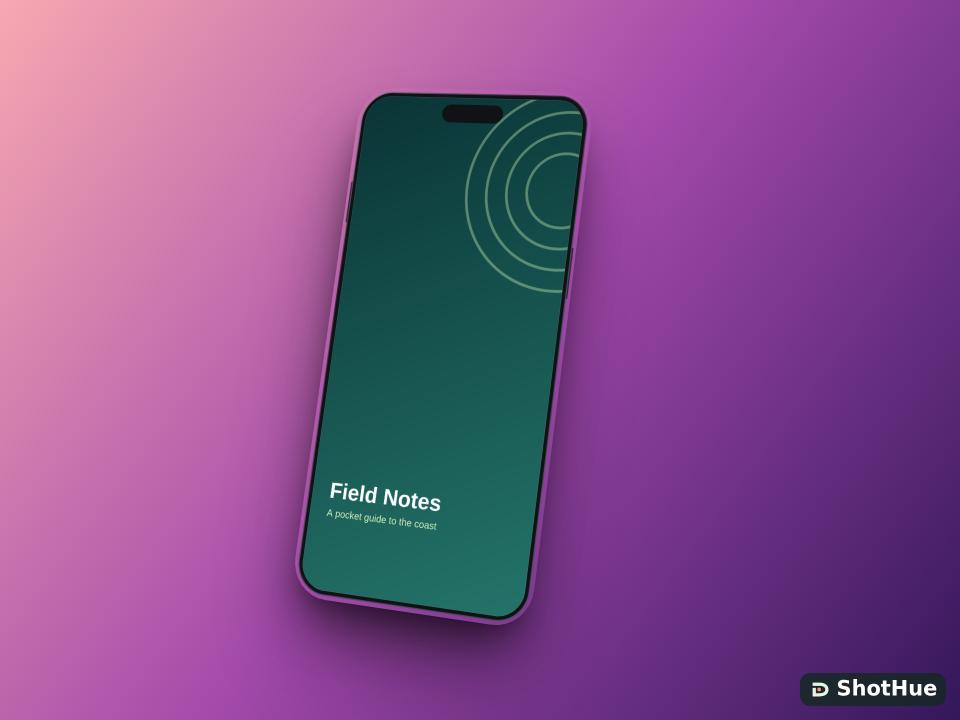
Use ShotHue’s Handheld Glow template. Make a forest-green title card that says “Field Notes” with the subtitle “A pocket guide to the coast”. Export a 960-pixel-wide PNG and give me the download link.
Work with a screenshot
Use list_templates to browse 43 templates. Its result includes the exact slug and the number of image slots. In render_mockup, supply one input per slot, in order. Each input can be a base64 PNG, a title card or a built-in sample. A client with access to your file can encode it as PNG. An attachment in a chat can be used only if that client passes its contents to the tool.
For a product website, try Silver Mist Window with the portfolio sample. For two screens, use Staggered Display and give it two different inputs.
Exports are 480 or 960 pixels wide and preserve the template aspect ratio. Animated templates default to the frame chosen for their gallery poster. You can also specify a time in seconds. Open the linked editor to export a video. Read the machine-readable template catalog.
Where the image goes
The AI tool sends the inputs you choose to ShotHue’s rendering server. It keeps the finished file in memory for up to ten minutes. Anyone with its temporary link can download it during that time. Download the file before the link expires. AI exports include the ShotHue watermark.
For a private local edit, use the browser editor. Your AI provider has its own rules for content shared in chat.